 Guide On Map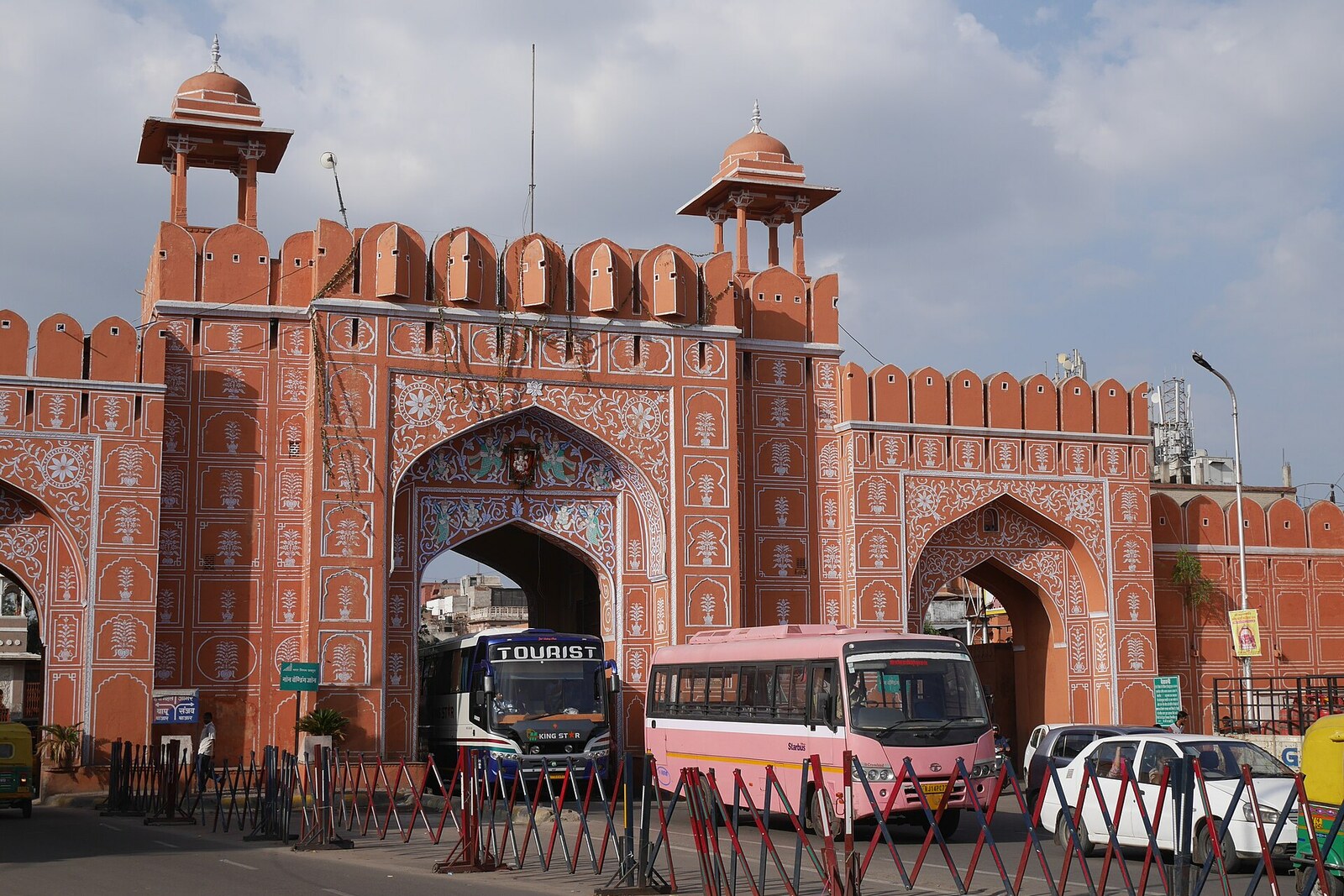
Look around first
What to notice
- Three arched openings
- A section of the city wall
- The beginning of Johari Bazaar
The story of the place
Three arches have been cut through the city wall here: traffic flows through them continuously, and Johari Bazaar stretches out beyond them. On the early plan, this passage was called Shiv Pol, after the neighboring temple of Shiva; later, another name took hold, pointing to the road to Sanganer. Textile printers were already at work in that town, and paper and carved wooden blocks for textile printing were made there, so the route linked Jaipur with an experienced neighboring craft community. The wall, the passage, and the directional name remain from the border crossing, although there have been no collectors here for a long time.
In seventeen twenty-seven, Sawai Jai Singh II, the ruler of neighboring Amber, began building a new capital. He wanted to earn income from trade, so he chose a plain and directed the main entrances toward the main road. These southern gates lay on the route to Sanganer.
Walls and streets alone were not enough: people were needed who were ready to bring their money and crafts here. Jai Singh began personally sending invitations to merchants. One of them, addressed to Ram Kishan Ram Sewag, has survived in the archive. The ruler wrote that the new city had already been founded, offered him the chance to build a house and a shop here, and added that officials had been ordered to reduce his border duties.
A house and a shop in the same letter meant moving with one's family and entire business. To persuade a merchant to invest in a city still under construction, Jai Singh gave out land, provided shop spaces, and exempted those he invited from part of their taxes. Bankers, jewelers, textile printers, papermakers, and other artisans received such letters. They moved to Jaipur, occupied the quarters assigned to them, and opened workshops and trading houses. The treasury gained the turnover for which the new city had been conceived, and its broad streets filled with markets.
Sanganer was one of the places from which these people came. A large community of textile printers, founded by migrants from Gujarat, was already at work there; paper and wooden printing blocks were also made there. That is why the opening in the southern wall was increasingly called Sanganeri—the gate on the road to Sanganer. On the early city plan, it had a different name: Shiv Pol, the Gate of Shiva, after the neighboring temple.
Now no border-duty collectors stop anyone here. City traffic passes through the three arches, and the road of Johari Bazaar begins immediately beyond them. What remains of the former system is the opening in the wall itself and the name pointing toward the place from which Jai Singh once called merchants and artisans to the new capital.
Useful on site
Open around the clock; these are city gates with no admission ticket.
Checked: June 17, 2026. Check the official source before visiting.View the gate from outside and choose a spot away from the traffic flow. You do not need to enter any building for this stop.